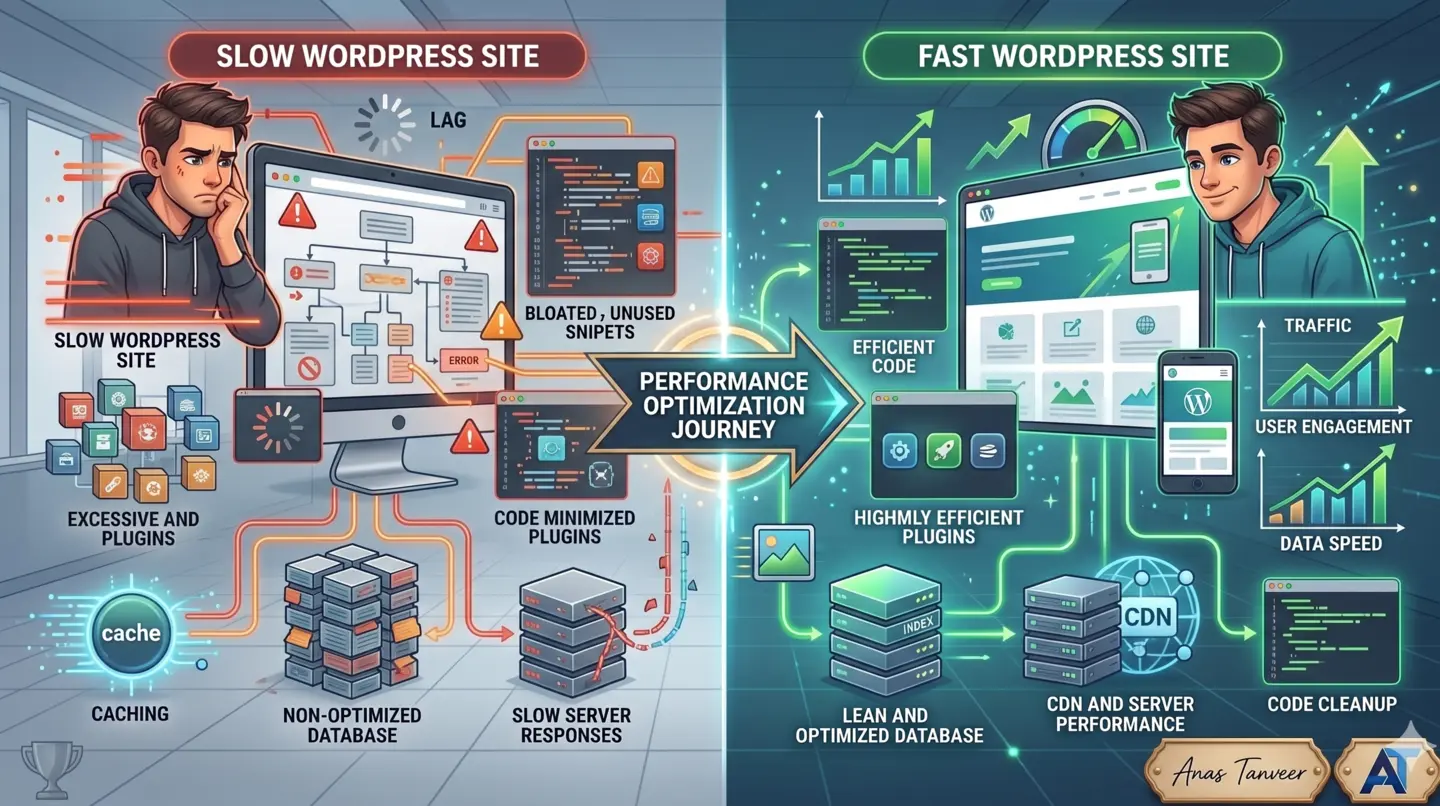


Why Is My Website Slow? The Short Answer
Your website is slow because too much work happens before the first meaningful pixel appears — usually a slow server response, oversized images and scripts, or a browser forced to render blocking code. Website speed optimization in Dubai means fixing those three layers in order, targeting Google's 2026 Core Web Vitals: LCP under 2.5 seconds, INP under 200 milliseconds, CLS under 0.1.
Most slow sites are not slow for one dramatic reason. They are slow because of a stack of small, ignored decisions: a cheap US-based host, uncompressed hero images, twelve plugins, and a theme that loads fonts and sliders before your content. Each adds a few hundred milliseconds. Together they push you past three seconds — the point where UAE mobile visitors start leaving.
In the 100+ projects I've delivered, the single most common mistake I see is business owners installing a caching plugin and assuming the job is done. Caching helps one layer. If your real problem is a bloated theme or a slow database query, caching just hides it for logged-out users while your checkout and dashboard stay slow.
The 3-Layer Speed Audit: My Diagnostic Framework
I run every site through what I call The 3-Layer Speed Audit before I change a single line of code. It stops you from guessing. You measure each layer, find the worst offender, and fix that first. The three layers are Server, Asset, and Render — in the exact order a request travels.
Layer 1 — Server: How long until your host sends the first byte (TTFB)? This covers hosting quality, hosting location, PHP version, and database queries. Target: TTFB under 600ms, ideally under 300ms. Slow here and everything downstream is late.
Layer 2 — Asset: How heavy is what you send? Images, fonts, CSS, JavaScript. This is where WebP/AVIF, compression, and lazy loading live. Target: total page weight under 1.5MB, hero image under 200KB. This layer usually owns your LCP score.
Layer 3 — Render: How efficiently does the browser paint and stay interactive? Render-blocking scripts, layout shifts, heavy third-party tags. This layer owns your INP and CLS scores. Fix it and the page feels instant even on a mid-range phone.
The rule: never optimize a lower layer until the higher one passes. Compressing images (Layer 2) is pointless if your server takes two seconds to respond (Layer 1). Diagnose top-down, fix top-down.
What Are Core Web Vitals in 2026, in Plain Language?
Core Web Vitals are three Google-measured signals for how a real visitor experiences your page loading and responding. They are part of Google's ranking system, and in 2026 they are measured on actual mobile Chrome visits, not lab tests — so field data from real Dubai users is what counts.
LCP (Largest Contentful Paint) — how long until the biggest thing on screen (usually your hero image or headline) is visible. Plain version: how fast does the page look loaded? Good: under 2.5 seconds.
INP (Interaction to Next Paint) — how quickly the page reacts when someone taps a button or opens a menu. Plain version: does it feel laggy or snappy? Good: under 200 milliseconds. INP replaced the old FID metric and is stricter.
CLS (Cumulative Layout Shift) — how much the page jumps around while loading, like a button sliding down as an ad loads and you tap the wrong thing. Plain version: does content stay put? Good: under 0.1.
A definition worth quoting: a page passes Core Web Vitals only when 75% of real visits meet all three thresholds. One good load does not save you — consistency across your traffic does.
Does Website Speed Actually Affect Google Ranking and Sales?
Yes — speed affects both ranking and revenue, and the revenue impact is larger. Core Web Vitals are a confirmed Google ranking factor, but they act as a tiebreaker: among pages of similar relevance, the faster one wins. The bigger effect is on conversions, where speed is direct and brutal.
The widely-cited industry benchmark: a site loading in 1 second converts roughly 2.5 to 3 times better than one loading in 5 seconds. Bounce probability rises sharply — moving from 1s to 3s load time increases bounce likelihood by around 32%, and 1s to 5s by roughly 90% in Google's own mobile data.
Put that in AED terms. If your Dubai ecommerce store does AED 100,000/month and a speed fix lifts conversion by even 15% — a conservative outcome when you cut load time from 5s to 2s — that is AED 15,000/month, or AED 180,000/year, from work that costs a fraction of that once.
Expert insight: for lead-generation businesses — real estate agencies, contractors, clinics — the loss is quieter but real. Slow mobile pages mean fewer form submissions and cheaper visitors bouncing before they see your offer. You never see the enquiry you didn't get.
Symptom to Fix: The Diagnostic Table
Use this table to map what you're seeing to the layer, the real cause, and the expected gain. This is the reference I hand clients so they understand what they're paying for.
Symptom: Slow even on a fast connection, spinner before anything loads → Layer: Server → Cause: Slow/overseas host, no caching, heavy queries → Fix: UAE/nearby-region hosting or CDN, server + object caching, upgrade PHP 8.2+ → Expected gain: 300-800ms off TTFB.
Symptom: Hero image and text appear late → Layer: Asset → Cause: Huge uncompressed images (JPEG/PNG) → Fix: Convert to WebP/AVIF, resize to display size, preload the hero → Expected gain: LCP improves 1-2s.
Symptom: Score fine on desktop, terrible on mobile → Layer: Asset/Render → Cause: Desktop-sized images and scripts served to phones → Fix: Responsive images (srcset), defer non-critical JS → Expected gain: 30-50% faster mobile LCP.
Symptom: Buttons and menus feel laggy → Layer: Render → Cause: Heavy JavaScript, too many third-party tags → Fix: Remove unused JS, defer analytics/chat widgets, break up long tasks → Expected gain: INP drops under 200ms.
Symptom: Page jumps while loading → Layer: Render → Cause: Images/ads without set dimensions, late fonts → Fix: Set width/height on all media, reserve ad space, preload fonts → Expected gain: CLS under 0.1.
Symptom: WordPress admin and site both crawl → Layer: Server/Asset → Cause: Plugin bloat, no caching → Fix: Audit and remove plugins, add page caching → Expected gain: 40-60% faster loads.
Why Is My WordPress Site Slow? The Plugin Bloat Problem
Your WordPress site is most likely slow because of plugin bloat — every active plugin loads its own CSS and JavaScript on every page, adds database queries, and often runs on pages that don't even use it. This is the number-one hidden killer I find on GCC WordPress sites, especially trading-company and service-business sites built by cheap agencies.
The pattern is predictable: a slider plugin, three form plugins doing one job, a page builder loading its full library sitewide, a security plugin scanning on every request, and two analytics plugins firing duplicate tags. Individually harmless. Stacked, they turn a 1-second page into a 5-second one.
My WordPress speed checklist, in order: audit plugins and delete anything not earning its weight; replace a heavy page builder's global assets with per-page loading; add a proper caching layer (page + object cache); convert the media library to WebP; and move to a host with a UAE or nearby edge. That sequence alone typically halves load time.
One rule I enforce: if a plugin adds a feature you could replace with 10 lines of code or a theme setting, remove the plugin. Fewer moving parts is faster and safer. As Anas Tanveer, a full-stack Laravel developer in Dubai, I apply the same discipline to WordPress — treat the site like an application, not a pile of add-ons.
WordPress vs Custom Build vs Shopify: Which Is Faster?
A common question from Dubai business owners choosing a platform: which is fastest out of the box? The honest answer is that the platform matters less than how it's built — but each has a realistic speed ceiling and a typical failure mode.
WordPress: Most flexible, most common in the UAE, and the easiest to make slow. Realistic well-optimized LCP: 1.5-2.5s. Failure mode: plugin and theme bloat. Best when you need content, blogging, and custom functionality on a budget. Requires ongoing discipline to stay fast.
Custom build (Laravel/React): The fastest ceiling because you ship only the code you write — no plugin overhead, no theme baggage. Realistic LCP: 0.8-1.5s. Failure mode: higher upfront cost and needs a real developer. Best for web apps, portals, high-traffic stores, and anything where speed is revenue-critical.
Shopify: Fast, managed hosting with a global CDN included, so Layer 1 is largely handled for you. Realistic LCP: 1.5-2.5s. Failure mode: bloated themes and too many third-party apps — the Shopify equivalent of plugin bloat. Best for straightforward ecommerce that wants zero server management.
Decision rule: choose the platform for your business need first, then budget for optimization as a line item, not an afterthought. A well-built WordPress site beats a neglected custom one every time.
Does Hosting Location Matter for UAE Visitors?
Yes — hosting location has a direct, measurable effect for UAE and GCC visitors. Every request to a US server travels roughly 12,000 km each way; that physical distance alone adds 150-300ms of latency per round trip, and a page makes dozens of round trips. A server in the UAE, or a CDN edge in the region, can shave 200-600ms off real-world load time.
This is why a site that scores well on a US-based testing tool can still feel sluggish to your customer in Dubai or Riyadh. The test ran close to the server; your customer didn't. Always test from a UAE location or with real field data.
Two practical options: host in a UAE or nearby region (good for dynamic pages like checkout and dashboards), or put a global CDN in front of your existing host so static assets — images, CSS, JS — are served from a Dubai-adjacent edge. For most sites, a CDN gives 80% of the benefit for a fraction of the cost.
Expert insight: for GCC ecommerce and real-estate sites, I almost always pair regional hosting with a CDN. The CDN handles the heavy static assets globally, and regional hosting keeps the dynamic, logged-in experience — the part that actually converts — fast.
Your 2026 Speed Fix Checklist
Work this list top to bottom. It mirrors The 3-Layer Speed Audit, so you fix the highest-impact layer first. Prices are typical Dubai market ranges for professional implementation.
Server layer: Confirm TTFB under 600ms; move to UAE/regional hosting or add a CDN; enable page + object caching; upgrade to PHP 8.2+; audit slow database queries.
Asset layer: Convert all images to WebP or AVIF; resize images to their actual display size; add responsive srcset for mobile; lazy-load everything below the fold; self-host and preload critical fonts; minify and combine CSS/JS.
Render layer: Defer non-critical JavaScript; remove unused scripts; set explicit width and height on every image and video; reserve space for ads and embeds; delay third-party tags (chat, analytics) until after load.
Measurement: Test with real field data (Chrome UX Report / Search Console), not just a one-off lab score; verify 75% of visits pass all three Core Web Vitals; re-test from a UAE location; monitor monthly, because plugins and content re-bloat over time.
Budget guide: A focused speed optimization for a typical WordPress or Shopify site in Dubai runs roughly AED 1,500-4,500 depending on depth; a full performance rebuild sits higher. Set it against the revenue a faster site recovers — the math almost always favours fixing it.
Practical checklist
Measure TTFB and confirm it is under 600ms before touching anything else
Move to UAE/regional hosting or add a CDN edge for GCC visitors
Convert all images to WebP/AVIF and resize to actual display size
Enable page and object caching, and upgrade to PHP 8.2+
Defer non-critical JavaScript and delay third-party chat/analytics tags
Set explicit width and height on every image, video, and ad slot
Audit and remove bloated WordPress plugins earning less than their weight
Verify 75% of real visits pass LCP <2.5s, INP <200ms, CLS <0.1
How to turn this into a real project decision
Start by writing the business problem in one line. For example: the website is slow, the Shopify product page is confusing, the WordPress site does not generate quality leads, or the Laravel dashboard cannot support the workflow anymore. A clear problem statement makes the technical decision easier.
Next, separate the requirement into user experience, backend logic, SEO, speed, integrations and content. This prevents the common mistake of redesigning a page when the real issue is data structure, plugin conflict, weak copy, poor mobile UX or missing automation.
For Dubai, UAE and international clients, the strongest web solution is usually the one that improves trust, reduces manual work, loads fast on mobile and gives visitors a clear reason to contact the business. That is the standard I use when planning Laravel, WordPress, Shopify, ecommerce, dashboard and SEO-focused work.
FAQs
What is a good page speed score?
A good page speed score means passing all three Core Web Vitals: LCP under 2.5 seconds, INP under 200 milliseconds, and CLS under 0.1, for at least 75% of real visits. On lab tools like PageSpeed Insights, aim for 90+ on mobile — but real-world field data from actual Dubai visitors matters more than any single lab number.
Does website speed affect Google ranking?
Yes. Core Web Vitals are a confirmed Google ranking factor and act as a tiebreaker between pages of similar relevance — the faster page wins. The larger effect, however, is on conversions: a slow page loses sales and leads before ranking even comes into play, so speed protects both your traffic and your revenue.
Why is my WordPress site slow?
Most WordPress sites are slow because of plugin bloat and a heavy theme — each active plugin loads its own scripts and database queries on every page. Add uncompressed images, no caching, and overseas hosting, and load times climb past 5 seconds. Auditing plugins, adding caching, and converting images to WebP typically halves load time.
What are Core Web Vitals?
Core Web Vitals are three Google metrics measuring real user experience: LCP (how fast the main content appears), INP (how quickly the page responds to taps and clicks), and CLS (how much the layout shifts while loading). Good scores are LCP under 2.5s, INP under 200ms, and CLS under 0.1, measured on real mobile visits.
How fast should a website load in 2026?
In 2026, aim for your largest content to appear within 2.5 seconds on mobile, with the page fully interactive shortly after. A well-optimized WordPress or Shopify site achieves 1.5-2.5 seconds; a custom Laravel or React build can hit under 1.5 seconds. Anything past 3 seconds measurably increases bounce rate and lost sales.
Does hosting location matter for UAE visitors?
Yes, significantly. A US-based server adds 150-300ms of latency per round trip for UAE visitors due to physical distance, and pages make dozens of round trips. Hosting in the UAE or a nearby region, or adding a regional CDN edge, can cut 200-600ms off real-world load time for your Dubai and GCC customers.
Ready to discuss this?
Send your website URL, platform, issue and goal — I'll reply with a practical direction within 4 hours. Free 20-min discovery call available.
Message on WhatsApp — Free 20-min callRelated service
Looking for hands-on help with this?
Speed Optimization ServicesRelated services

Need help applying this to your project?

Anas Tanveer
Full-Stack Developer in Dubai with 7+ years in Laravel, WordPress, Shopify, business dashboards, APIs, and SEO-ready web systems.
View profile